Command Wheel - Customizable Windows Radial Launcher
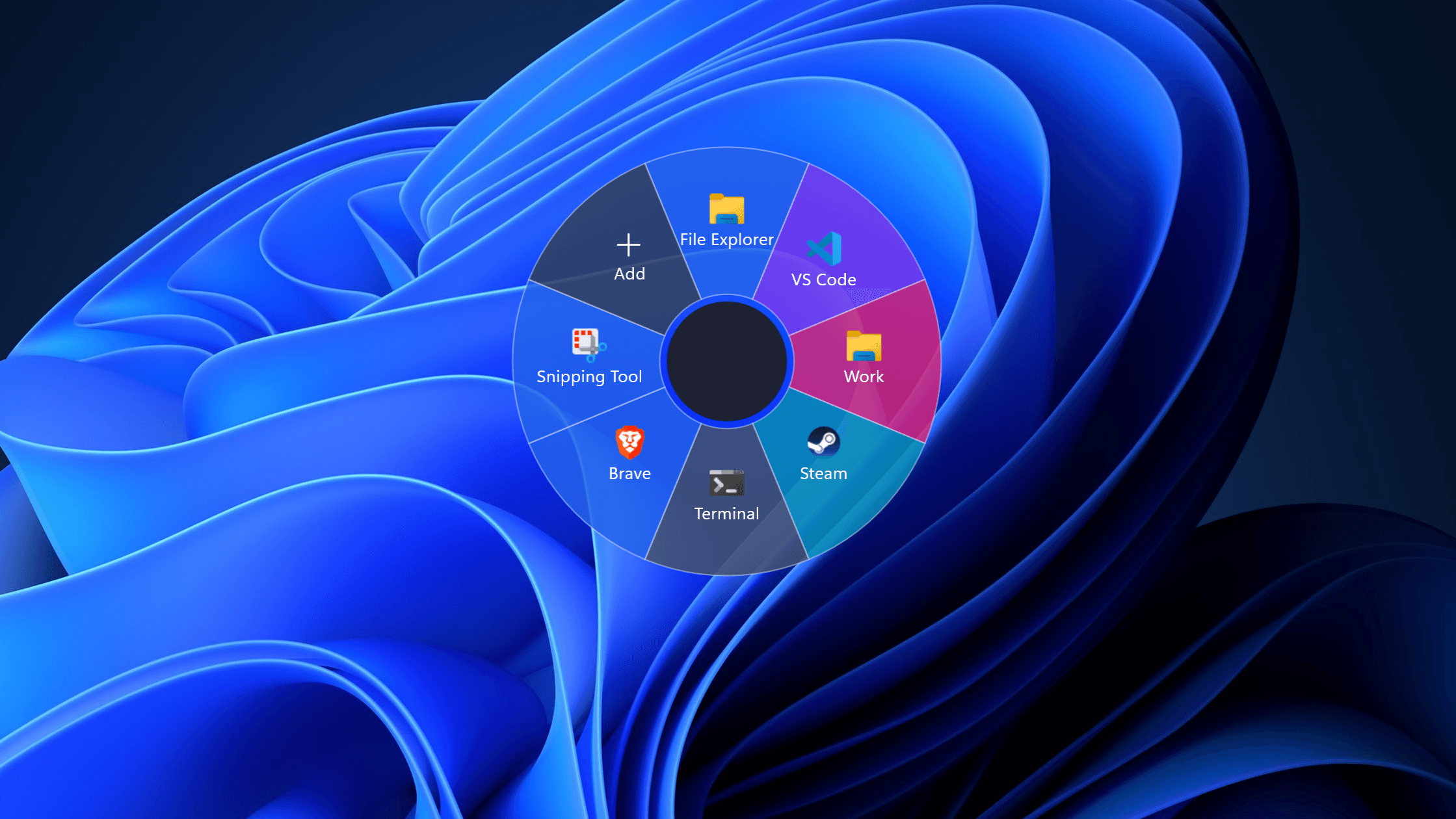
Command Wheel radial launcher open on the Windows desktop. Image 1 of 3.
1 / 3
Overview
Command Wheel is a native Windows productivity application created to make frequently used actions accessible without interrupting the user's workflow. A global keyboard shortcut or configurable mouse button opens a transparent radial overlay at the pointer, where the user can select and launch an action in one fluid movement. The product includes a complete wheel editor, multiple wheel profiles, automatic executable icon extraction, custom icons and colors, light and dark themes, import and export, startup integration, and resilient local storage. It was developed as a commercial KaruSystems product and published through Microsoft Store with automated building, testing, packaging, and release validation.
Fast Radial Activation: Opens a transparent command wheel at the pointer through configurable global keyboard and mouse shortcuts, supporting both hold-and-release and click activation workflows.
Flexible Action System: Launches applications, URLs, files, folders, text actions, and command-line operations configured by the user.
Custom Wheel Editor: Supports multiple named wheels, four to eight configurable actions per wheel, reordering, duplication, per-segment colors, labels, tooltips, arguments, and an always-available settings segment.
Application and Icon Integration: Extracts icons from Windows executables, supports resource indexes and custom image selection, and includes a browsable Windows 11 icon library.
Production Distribution Workflow: Includes automated builds, tests, release checksums, MSIX packaging, Store identity validation, and GitHub release-candidate workflows for Microsoft Store submission.
Technologies Used
C# and .NET 8: Implemented the application, action engine, persistence, validation rules, and Windows integrations in a modular multi-project solution.
WinUI 3 and Windows App SDK: Built a modern Windows 11 settings experience and a native desktop application with system-theme support.
Win32 Interop: Implemented global hotkeys, mouse activation, notification-area behavior, focus handling, executable icon extraction, and transparent overlay positioning across monitors and DPI settings.
SQLite: Persisted wheel profiles and user configuration locally with migration, backup, and recovery support.
MSIX and GitHub Actions: Automated testing, Store-compatible package generation, artifact verification, versioning, and release-candidate creation.
Challenges and Learnings
The central challenge was making a global desktop interaction feel immediate and dependable while coordinating keyboard and mouse hooks, transparent-window rendering, focus restoration, multi-monitor coordinates, display scaling, and safe action execution. Packaging a full-trust WinUI 3 application for Microsoft Store also required careful work around Store identity, manifest validation, version rules, startup integration, automated release checks, and certification requirements. The project strengthened my understanding of native Windows behavior, defensive desktop application design, and the operational work required to turn a prototype into a distributable commercial product.
Outcome
Command Wheel evolved into a polished Windows productivity product with a configurable interaction model, modern settings interface, robust local persistence, and a tested release pipeline. Following development, validation, packaging, and Partner Center certification, the application was published and is now available from Microsoft Store.